
Most of what you build for Nebius-hosted NVIDIA Grace Blackwell NVL72 carries over to NVIDIA Vera Rubin NVL72
Most of what you build for Nebius-hosted NVIDIA Grace Blackwell NVL72 carries over to NVIDIA Vera Rubin NVL72
A new GPU generation has usually meant new work for software teams. Kernels compiled only for the NVIDIA Hopper GPU architecture did not run on the NVIDIA Blackwell architecture; FlashAttention-3 is one example. Teams that adopt NVIDIA GB300 NVL72 port their container images to Arm, learn how memory is shared across compute trays, and arrange their communication-heavy ranks inside a single NVIDIA NVLink domain. Since Nebius announced that NVIDIA Vera Rubin NVL72 is coming to Nebius AI Cloud, those teams have been asking us a version of the same question: how much of that has to be done again?
Our experience so far is that most of it does not. We have brought up and tested Nebius systems with NVIDIA GB300 NVL72 and with NVIDIA Vera Rubin NVL72, and we submitted results from both to MLPerf® Inference v6.1: 72 GPUs across 18 nodes on GB300 NVL72, and 36 GPUs across 9 nodes on Vera Rubin NVL72 in the preview category. In that work, what we had built for GB300 NVL72 was reused: the Arm image family, the layout of 4 GPUs per node, and the NVLink-domain placement carried across. What remained was concentrated in two places: the compiled NVIDIA CUDA kernels, which needed rebuilding where they had been compiled only for NVIDIA Blackwell Ultra, and the settings tuned for the NVIDIA Grace CPU and the Blackwell Ultra memory system, which needed retesting.
TL;DR
On Nebius systems, most of what we built for NVIDIA GB300 NVL72 carried over to NVIDIA Vera Rubin NVL72: the Arm image family, the layout of 4 GPUs per node, and the NVLink-domain placement.
We submitted results from both to MLPerf Inference v6.1: 72 GPUs across 18 nodes on GB300 NVL72, and 36 GPUs across 9 nodes on Vera Rubin NVL72 in the preview category.
What changes: images need a newer NVIDIA CUDA base, kernels compiled only for NVIDIA Blackwell Ultra need a rebuild, and settings tuned for the NVIDIA Grace CPU and the Blackwell Ultra memory system need retesting.
This post is for teams that have already built for a Grace Blackwell rack-scale system. It covers only the move between rack-scale systems.
Most of the work can start before the hardware arrives: run the four cuobjdump and smoke-test commands from the Preparation section inside each workload image on your current system, and save the output with your baseline.
In this post, we walk through the move in the six phases we use for every migration to Nebius AI Cloud, from our migration guide: assessment, planning, preparation, validation, transfer, and optimization. Most of the technical work sits in preparation and validation, and most of it can start before the hardware arrives.
Assessment: most of the Grace Blackwell port carries over
The assessment phase documents the parameters that define compatibility: CUDA and driver versions, the scheduler, storage types, framework versions, dataset size, and checkpointing behavior. For a team that has built for a Grace Blackwell rack-scale system, most entries on that list do not change with the hardware.
Start with the shape of a node. Each Vera Rubin NVL72 compute tray holds two superchips, and each superchip pairs one NVIDIA Vera CPU with two NVIDIA Rubin GPUs. NVIDIA Vera is the CPU for agents, delivering up to 2x faster agentic CPU performance for longer-thinking agents, faster-learning RL systems, and data-driven AI factories. With two superchips, each tray holds 4 GPUs, as on Grace Blackwell rack-scale systems, and in our MLPerf runs a tray was one node of 4 GPUs on both platforms. If your allocation exposes a tray as one node, GPU requests, host lists, and rank layouts keep the same form.
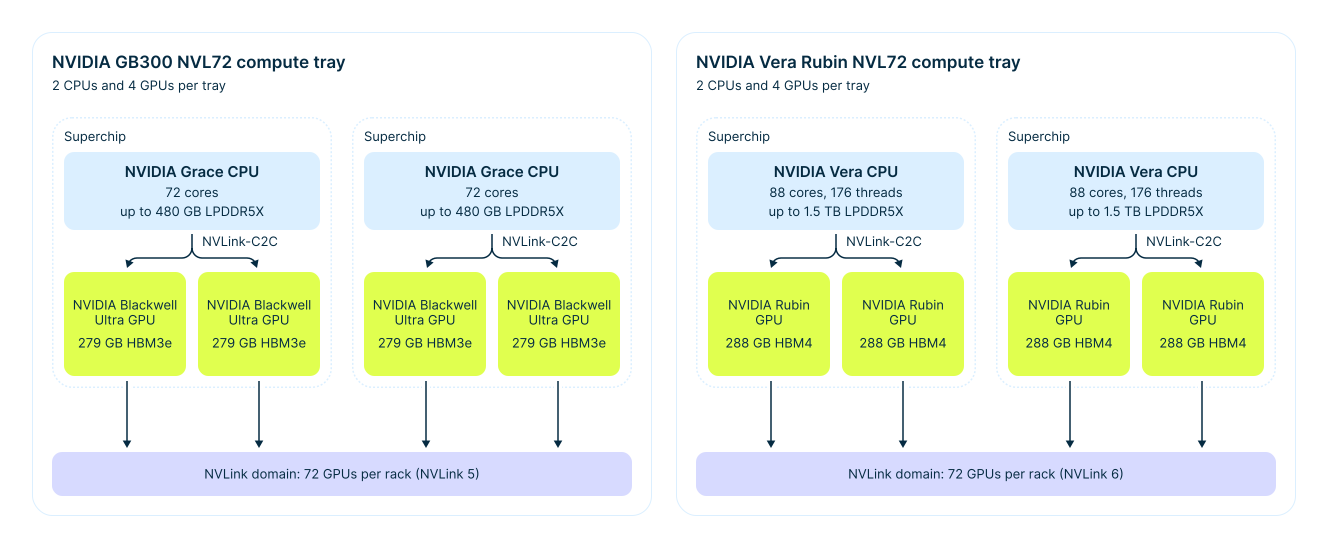 Figure 1. Compute tray layout on GB300 NVL72 and Vera Rubin NVL72: two superchips per tray, each pairing one CPU with two GPUs. Memory figures are NVIDIA’s platform maximums; exact tray layout varies.
The Arm port carries over too. The NVIDIA Vera CPU is fully Arm-compatible on the Arm v9.2 architecture, so the linux/arm64 images, aarch64 wheels, monitoring agents, and storage clients you prepared for Grace are the starting point for Vera. You should not need another architecture port. The images still have to be rebuilt on a newer CUDA base, because an image that runs on your current system can lack the Rubin kernels: at the time of writing, NVIDIA notes that the vLLM images published through v0.28.0 are built against CUDA 13.0.3 and do not contain the compiled Rubin kernel. If you install the NVIDIA GPU Operator or DRA driver yourself, use versions that recognize Rubin; NVIDIA validated Vera Rubin NVL72 with GPU Operator v26.7.0 and DRA driver v0.5.0.
The NVLink domain still contains 72 GPUs, and memory sharing across trays works the same way. On Grace Blackwell NVL72 systems, NVIDIA’s IMEX daemon runs on every compute tray and lets GPUs on different trays take part in a shared-memory programming model; NVIDIA’s rack-scale scheduling guide states that the same capabilities will be supported on Vera Rubin, and NVIDIA has since run a cross-node NCCL all-reduce over NVLink through IMEX on Vera Rubin NVL72. Keep tensor-parallel and expert-parallel groups inside one NVLink domain, as before.
The scheduling layer carries over as well. On Managed Service for Kubernetes®, the topology.nebius.com/tier-0 node label marks the closest topology level, which can be a multi-node NVLink domain. Nebius sets the label only on nodes that support that type of communication, so check that your new nodes expose it before you write placement rules against it; the topology-aware scheduling documentation describes the labels. In Slurm, represent the NVLink partition as a block in the topology/block plugin.
Record the NVIDIA Collective Communications Library (NCCL) environment in the same pass. Overrides accumulate, and a variable set two platforms ago to work around a bug tends to survive into the next deployment. Leave NCCL_CUMEM_ENABLE at its default and list every inherited override with the reason it was added, so that each one can be re-evaluated on Rubin. Record the NCCL version as well. NCCL 2.32.3 is the first release with Rubin support, and its release notes say that performance tuning for Rubin is not included yet. An NCCL version pinned in your current image therefore does not carry over.
Planning: for Grace Blackwell teams, Vera Rubin is closer to a replatform than a refactor
Our migration guide sorts moves into three strategies. A rehost keeps the GPU model and changes almost nothing. A replatform moves to upgraded GPUs within a generation and needs configuration changes; NVIDIA HGX H100 to NVIDIA HGX H200 is the example we use. A refactor moves to a new GPU generation and often needs pipeline or code changes; the example we give is HGX H100 to GB300 NVL72.
For a team that has already done the rack-scale port, we plan the move to Vera Rubin NVL72 as something closer to a replatform. The pipeline, the parallelism layout, the scheduler integration, and the Arm image family stay. What changes is the compute capability the kernels were compiled for, the CPU the data loaders were tuned for, and the memory system the offload buffers were sized for. If you are coming from NVIDIA HGX B200 or NVIDIA HGX B300 rather than from a Grace Blackwell rack-scale system, the Arm port is still ahead of you; this post covers only the move between rack-scale systems.
The generation change also changes what to measure first. Start with the same batch size and the same parallelism layout, and check peak memory before you rely on them. HBM bandwidth is higher on Rubin, so inference with a large share of decode, which often depends on memory bandwidth, is the first place to measure. NVLink 6 is faster than NVLink 5, so jobs that split one model across several GPUs with tensor or expert parallelism are the second. The Vera CPU has more cores than Grace and runs two threads per core, so CPU work that runs next to the GPUs, such as data loading, reinforcement-learning rollouts, and sandboxes for agents, is the third. Size the cluster from these measurements. For published numbers on both platforms, see the MLPerf Inference v6.1 results from NVIDIA and from Nebius.
Plan the comparison in cost for the same amount of work rather than in GPU-hours, and fix the validation metrics now: output quality, throughput at your latency target, and cost per unit of work, measured with the same harness on both platforms.
Preparation: kernels compiled only for Blackwell Ultra need a rebuild
NVIDIA Rubin is compute capability 10.7, in the same major version as Blackwell Ultra’s 10.3; its compilation target is sm_107. CUDA 13.5 is the first release with production support for Rubin and pairs with the R620 driver branch; build, measure, and plan production on 13.5 or later. The frameworks and libraries in your images each have a first version with Rubin support. The table lists the versions we know of as of November 2026; check each project’s release notes before you pin a version.
| Component | Rubin support from |
|---|---|
| PyTorch | 2.15 (CUDA 13.4 wheels, experimental) |
| Triton compiler | 3.8 |
| NVIDIA CUTLASS | 4.8 |
| FlashInfer | 0.6.18 |
| vLLM | 0.27 |
| SGLang | 0.5.19 |
| NVIDIA Transformer Engine | 2.19 |
| NVIDIA cuDNN | 9.26 |
| NCCL | 2.32.3 |
Then look at what is inside the libraries. A CUDA library ships a fatbin that holds one or more cubins, machine code compiled for particular GPU architectures, and sometimes Parallel Thread Execution (PTX) code, an intermediate representation the driver can compile at run time. When a kernel is launched, the driver looks for a cubin it can use on the device and falls back to PTX if there is one. If it finds neither, the launch fails with:
no kernel image is available for execution on the device
Which cubins Rubin can use follows from the compilation target, under the compatibility rules in the CUDA programming guide:
| Build | Example target | On Blackwell Ultra (10.3) | On Rubin (10.7) |
|---|---|---|---|
| Baseline cubin | sm_100, sm_103 |
Runs | Runs |
| Family-specific cubin | sm_100f, sm_103f |
Runs | Runs |
| Family-specific cubin | sm_107f |
Fails to load | Runs |
| Architecture-specific cubin | sm_100a |
Fails to load | Fails to load |
| Architecture-specific cubin | sm_103a |
Runs | Fails to load |
| Architecture-specific cubin | sm_107a |
Fails to load | Runs |
| PTX only | compute_100, compute_103 |
Compiled at runtime | Compiled at runtime |
An sm_103a cubin runs on GB300 and fails on Rubin, so an image that runs today can fail on the first Vera Rubin node. Baseline and family-specific cubins run on Rubin because the driver finalizes them for the new architecture at load time; that tells you the kernel loads, and nothing about how it performs there.
Start the inspection with the CUDA extensions you build yourself, especially matrix-multiplication and attention kernels built on NVIDIA CUTLASS. NVIDIA’s guidance for header libraries such as CUTLASS and NVIDIA cuBLASDx is to build architecture-specific targets for the devices the code will run on, which is exactly the kind of binary that does not carry over. An extension that ships only sm_100a or sm_103a code needs rebuilding for Rubin. Custom kernels that use only family-specific NVIDIA Tensor Core instructions can use an f target. Simpler kernels, such as elementwise operations that use no architecture-specific features, can use baseline targets. Check the actual build flags and binaries; one package can contain several kinds of kernel.
Run the inspection inside the workload image, where the framework and its CUDA extensions are installed. For a Python package, python -m pip show -f PACKAGE_NAME lists the installation location and files; the CUDA kernels are in its .so files. Replace LIBRARY.so with the path to one of those, or to your own extension build, and SMOKE_TEST with a Python script that exercises the GPU operations your workload uses.
cuobjdump --list-elf LIBRARY.so            # Inspect the cubin targets
cuobjdump --list-ptx LIBRARY.so            # Check for a PTX fallback
CUDA_DISABLE_PTX_JIT=1 python SMOKE_TEST   # Test the cubin path
CUDA_FORCE_PTX_JIT=1 python SMOKE_TEST     # Test the PTX path
CUDA_DISABLE_PTX_JIT makes the driver use only the embedded cubins, so a kernel without a compatible one fails to load. CUDA_FORCE_PTX_JIT ignores the cubins and compiles the embedded PTX instead. Both are documented driver switches. Run the two smoke tests on each target platform; passing them on your current system does not establish Rubin compatibility.
For extensions you compile yourself, check whether sm_103f covers the instructions you need, include compute_103 PTX as a fallback where the toolchain supports it, and for code paths that need Rubin-only features, use sm_107f where it covers the instructions and sm_107a only where it does not. NVIDIA documents that sm_107f code also runs on later members of the same family, while sm_107a code runs only on Rubin. Validate the combination with your compiler and libraries.
Two more checks belong in this phase. Teams serving INT8-quantized models should confirm support in the Rubin kernels and libraries they intend to use; if the serving path requires a move to FP8 or NVFP4, include the quality evaluation in the migration plan. And if you train models, check checkpoint compatibility alongside kernel compatibility. A checkpoint from your current system carries over when the new framework version supports its format and model configuration. Restoring it means the model weights, the optimizer state, and the other training state your framework needs to resume; rebuilding the CUDA kernels alone does not establish that training will continue correctly. Start with the same parallelism layout. If you change how the model is distributed across GPUs, check whether your checkpoint loader supports resharding or requires a conversion first.
Validation: retune for Vera, then measure against your Grace Blackwell baseline
Validation runs a scaled-down version of the workload on the target and compares it with a baseline captured on the source, so the baseline comes first. Record step time, throughput at your latency target, loss curves, and checkpoint timings on your current system now, with the same harness you will run on Rubin, so that the later comparison is between two measurements.
CPU-side settings are the first thing to retest. Vera has 88 custom NVIDIA Olympus cores and 176 hardware threads; its NVIDIA Spatial Multithreading runs two threads per core by partitioning the core’s resources rather than time-slicing them. Grace has 72 cores with one thread each. CPU masks and worker counts chosen for Grace will land in different places on Vera. If your Grace setup uses one data-loader worker per core, do not double the count to match Vera’s thread count without testing it; derive the masks from the runtime topology and check that workers stay close to the GPUs they feed.
Read how we measured NUMA-aware process placement with one torchrun flag on NVIDIA B300: Why NUMA affinity matters for distributed training on Kubernetes
Host memory changes more than GPU memory. Vera supports up to 1.5 TB of LPDDR5X per CPU, against up to 480 GB on Grace. Peak memory bandwidth is up to 1.2 TB/s on Vera and up to 512 GB/s on Grace, and on both CPUs the largest memory configurations run below that peak. NVIDIA NVLink-C2C bandwidth between CPU and GPU rises to 1.8 TB/s per superchip. Offload and staging buffers get more room, provided your allocation carries that host-memory configuration. The exact configuration of a Nebius allocation can differ from the platform maximum, so size them from the configuration you receive.
Record the driver’s memory-management mode as part of the same check. From the R615 driver series on, the NVIDIA driver on hardware-coherent platforms defaults to Coherent Driver-based Memory Management (CDMM) instead of onlining GPU memory to the operating system as a non-uniform memory access (NUMA) node. NUMA mode remains supported, as a node-wide kernel module setting. The change applies to NVIDIA Grace Blackwell as well as Vera Rubin. To see which mode a node uses, run grep Coherent /proc/driver/nvidia/params “driver” means CDMM and “numa” means NUMA mode. The two modes expose GPU memory to the operating system differently, which matters for anything that offloads to host memory.
GPU memory capacity is about the same: we list 279 GB of HBM3e per GPU for GB300 NVL72, and NVIDIA lists 288 GB of HBM4 per Rubin GPU. That is why the existing parallelism layout is a reasonable starting point; check peak memory use with the new kernels and framework versions before you rely on it. Bandwidth changes more. NVIDIA’s specification table, as published in November 2026, lists 19.2 TB/s of HBM bandwidth and 3 TB/s of NVLink 6 bandwidth per Rubin GPU; the figures for GB300 NVL72 are 8 TB/s and 1.8 TB/s. If decode is memory-bandwidth-bound in your workload, compare throughput at the same latency target on both systems rather than peak throughput alone. The scale-out network also changes generation, to NVIDIA ConnectX-9 SuperNICs, and NVIDIA advises rechecking GPU-to-NIC affinity and NUMA placement on Vera Rubin trays for RDMA networking and NVIDIA GPUDirect Storage. Confirm the scale-out configuration of your allocation before you set inter-rack performance targets.
Storage belongs in validation too, and the first question is whether it can still keep the GPUs busy. If compute steps become faster, the same storage has to deliver more samples per second, and storage takes a larger share of each training cycle. During a short run, watch GPU utilization and the time data-loader workers spend waiting: if utilization drops while workers wait for data, storage or CPU preprocessing has become the limit. Then confirm that datasets and checkpoints are reachable from the new pods through the expected paths, mounts, and permissions, measure data-loading and checkpoint read and write times at the concurrency you plan to use, and test a complete checkpoint save and restore. For training, resume from a checkpoint written on your current system for a short run and compare loss and validation results with the baseline before continuing the full job.
Transfer: a new node group on the same storage
In a migration between clouds, transfer is the long phase: datasets move, egress is paid for, and writes are paused. In a move between platforms inside Nebius AI Cloud, the data stays where it is, and the phase shrinks to connecting the new compute to it. This holds for data on shared filesystems, which both node groups can mount at the same time. A disk can be used on one node at a time, so datasets and checkpoints that live on disks need to move to a shared filesystem before you run the two groups side by side.
On Managed Service for Kubernetes, a change of GPU platform means a new node group: the platform, preset, and GPU cluster of an existing group cannot be changed. Keep the existing group running while you test the Rubin group against the same workload, data, and evaluation harness.
The node group’s driver preset determines the CUDA toolkit and NVIDIA driver series installed on its nodes. Production support for Rubin starts with the R620 driver branch, so confirm that a compatible preset is available for your allocation before the access date. Changing the container image does not change the node driver.
Driver changes also shape recovery. Changing the driver preset on an existing node group recreates all of its nodes according to the group’s deployment strategy. Save checkpoints before any preset update, and keep the baseline group available until rollback has been tested.
Optimization: the bottleneck moves
Optimization starts once the workload runs correctly on Rubin and the baseline comparison is in hand. Memory bandwidth, NVLink bandwidth, and memory capacity do not change by the same amount, so the gain a workload sees depends on which of them limited it before. A kernel that was limited by memory bandwidth on GB300 NVL72 may be limited by compute on Rubin. Its launch settings may also need to change: the CUDA programming guide lists up to 16 resident blocks and 32 resident warps per streaming multiprocessor for compute capability 10.7, half of the limits for 10.3, and up to 328 KB of shared memory per streaming multiprocessor with an explicit opt-in.
Re-profile the kernels you rebuilt in preparation. Re-tune how compute and communication overlap on NVLink 6: the pipeline and microbatch settings that let collectives finish while the GPU was still computing were chosen for the slower NVLink 5. Do this on an NCCL release that includes performance tuning for Rubin. Re-size offload and KV-cache staging against the host memory the allocation provides. And re-measure the data loader with Vera’s thread topology, since the CPU work per step stays the same as the GPU time per step falls.
Start the assessment on your current images today
Most of this work does not need Rubin hardware. The inventory of compiled kernels needs only your images. The baseline measurements, the NCCL audit, and the checkpoint resume test run on your current system. Before moving the workload, check the following:
- Allocation and software. Confirm the configuration, access date, and the CUDA, driver, framework, and library versions you will run.
- Kernels and correctness. Inspect compiled targets, rebuild where needed, and compare numerical results with your current system.
- Placement and CPU settings. Check GPU requests, NVLink placement, CPU allocation, affinity, and data-loader worker counts.
- Data and checkpoints. Verify storage access, measure loading and checkpoint times, and test resuming training.
- Performance and recovery. Compare quality, throughput at your latency target, and cost for the same amount of work against the baseline, and keep the existing group available until recovery and rollback have been tested.
Run the four cuobjdump and smoke-test commands above inside each workload image on your current system and save the output with your baseline; the list of libraries that ship only sm_100a or sm_103a code is your preparation work list. Talk to the Nebius team about the allocation and software configuration for NVIDIA Vera Rubin NVL72.
Explore Nebius Token Factory


Contents
- Assessment: most of the Grace Blackwell port carries over
- Planning: for Grace Blackwell teams, Vera Rubin is closer to a replatform than a refactor
- Preparation: kernels compiled only for Blackwell Ultra need a rebuild
- Validation: retune for Vera, then measure against your Grace Blackwell baseline
- Transfer: a new node group on the same storage
- Optimization: the bottleneck moves
- Start the assessment on your current images today
See also

Cross-rack NIXL-EP over InfiniBand on GB300 failed during setup on SGLang 0.5.12 and 0.5.16, with a log that blamed a missing nvidia_peermem module. The real cause was a DMA-BUF registration failure inside the older NIXL packages. An image that bundles NIXL 1.4.0 or later, plus UCX_TLS=^cuda_ipc, fixed it; the post shows how to prove DMA-BUF is in use.
SemiAnalysis has named Nebius a Platinum AI cloud provider, the top tier of its ClusterMAX™ 3.0 rating. The rating is based on live testing of production clusters: burn-ins, storage under concurrent load, and automated failure recovery on real NVIDIA GB300 and NVIDIA HGX B300 hardware. This post covers what the testing found and why it matters for teams choosing where to run production AI.
Nebius has achieved NVIDIA Exemplar Cloud status on NVIDIA GB300 NVL72 for training, meeting the 95% performance threshold across NVIDIA’s reference benchmarking recipes. In this post, we explain what this validation means in practice and how it fits into Nebius’s broader work with NVIDIA on building production-grade AI infrastructure.