
LayerStream: faster MoE fine-tuning on fewer or cheaper GPUs
LayerStream: faster MoE fine-tuning on fewer or cheaper GPUs
How Nebius streams training state through GPU memory to fine-tune large mixture-of-experts models with less memory overhead, faster iteration and lower GPU cost.
When you fine-tune a large mixture-of-experts (MoE) model, you can end up adding GPUs just to fit the training state. LayerStream, our training engine at Nebius, reduces that memory burden so more of your GPU budget goes into training.
It keeps optimizer state and saved activations in host memory, then streams each layer’s working state through the GPU when that layer runs.
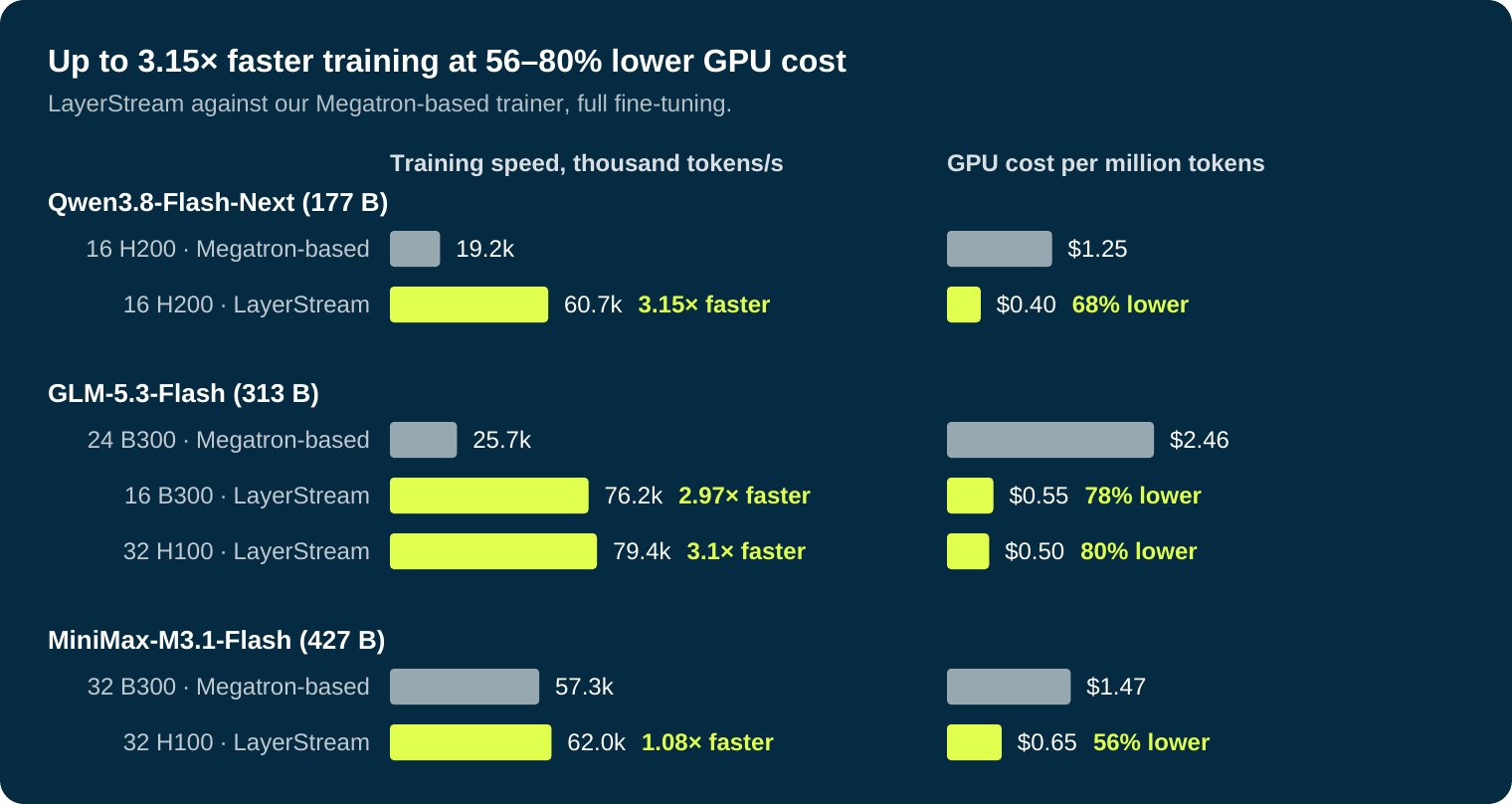
On the same 16 NVIDIA H200 GPUs, Qwen3.8-Flash-Next completed a pass over our 25.8-million-token dataset in 7.1 minutes instead of 22.4. Training throughput was 3.15× that of our tuned Megatron-LM-based trainer, with 68% lower GPU cost per token. Other tested configurations used fewer B300 GPUs or lower-priced H100 GPUs. The comparisons and their limits are below.
TL;DR
- LayerStream keeps optimizer state and saved activations in host memory, streaming each layer’s working state through the GPU.
- On the same 16 NVIDIA H200 GPUs, Qwen3.8-Flash-Next trained 3.15× faster at 68% lower GPU cost per token than our tuned Megatron-based trainer.
- For GLM-5.3-Flash, 16 B300 GPUs delivered 2.97× the throughput of a 24-B300 baseline at 78% lower GPU cost per token. That baseline uses different data and an RL loss.
- Separate matched-data checks show closely matching loss over one epoch. They do not establish equivalent downstream quality or longer-term convergence.
Why a sparse model still needs so much memory
MoE models have hundreds of billions of parameters, but each token uses only a small fraction of them. Training still needs to store state for the full model. Under the conventional layout used for our memory estimate, weights, gradients, a full-precision copy and optimizer state require about 18 bytes per parameter. For a 313-billion-parameter model, that is about 5.6 TB before accounting for activations.
Spreading that state across more GPUs makes the model fit, but it can also increase communication and cost. When experts are distributed across nodes, tokens travel over the network to reach them. GPUs with less memory can require a larger cluster just to hold the model, even when their compute would otherwise be useful.
LayerStream reduces that memory requirement by changing which state must remain on the GPU throughout training.
How LayerStream works
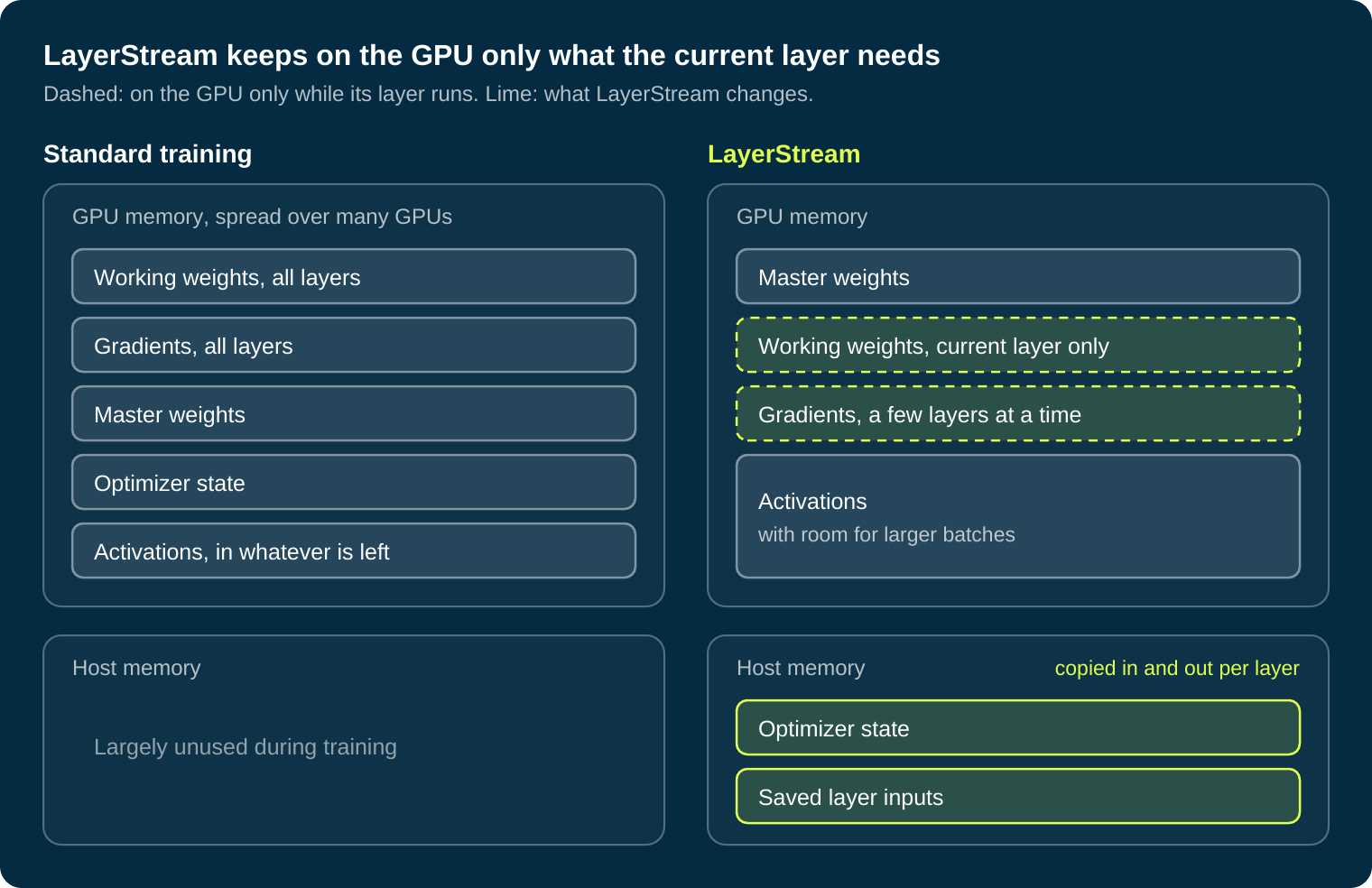
When all training state lives in GPU memory, it competes with activations for capacity, and the job is sized by memory instead of compute. LayerStream keeps the optimizer state and saved activations in host memory, and streams each layer’s working state through the GPU only while that layer runs. Four techniques reduce the memory, communication and recomputation overhead.
- Layer-at-a-time state. Keep the optimizer state in host memory and build each layer’s working weights on the GPU only while it computes that layer.
- In-pass updates. Apply each layer’s weight update during the backward pass, overlapping it with the remaining computation.
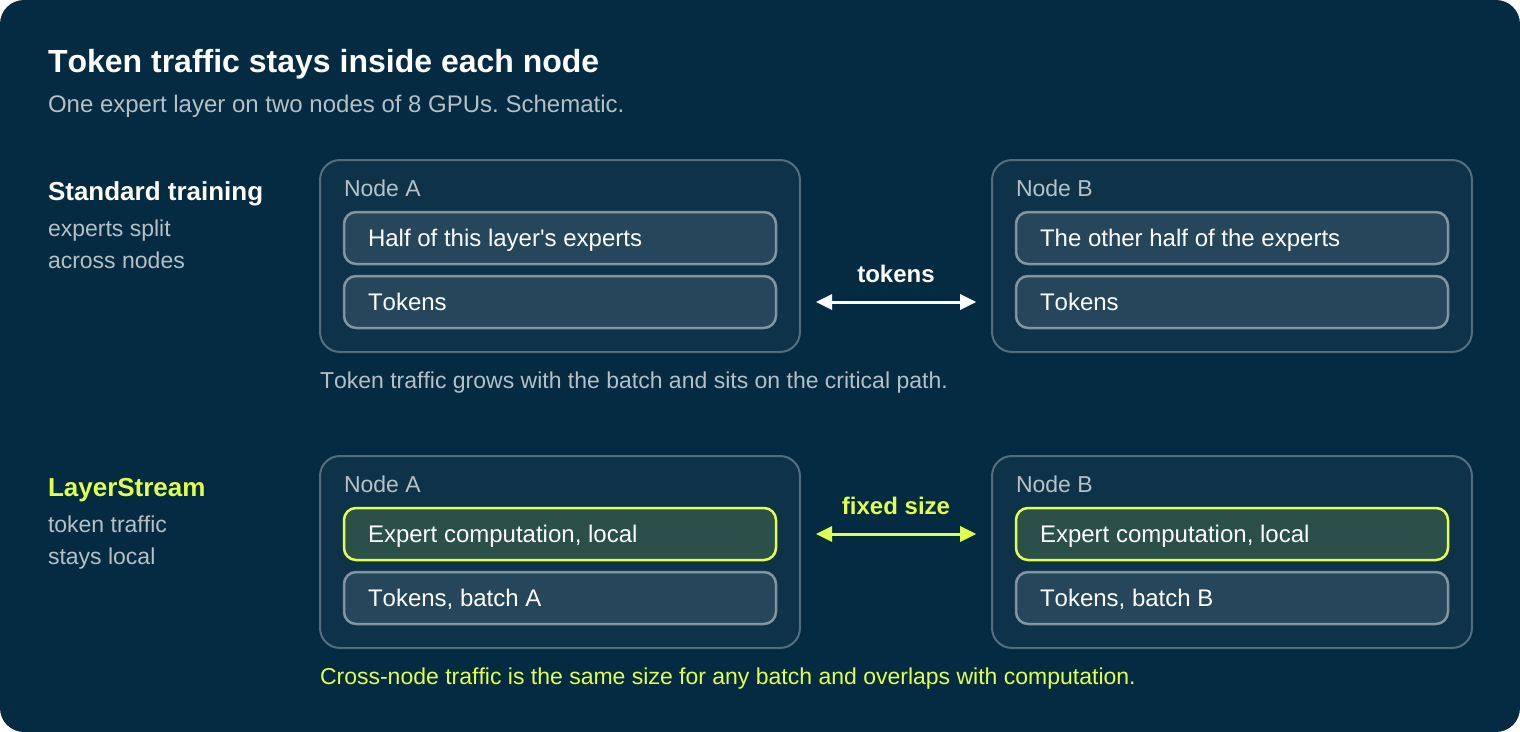
- Tokens stay local. Tokens reach their experts over the fast links inside a node; what crosses the network between nodes is fixed in size and overlaps with computation.
- Reuse intermediate results. Retain expensive forward-pass results for the backward pass, and balance work across GPUs.
Layer-at-a-time state
GPU memory is scarce and fast. Host memory is large and cheap. LayerStream puts each piece of training state where it is used. The optimizer’s running averages are needed once per step, so they live in host memory and visit the GPU only for their layer’s update. The 16-bit working weights exist only for the layer being computed. A layer’s gradients are used for its update and then freed, so the full set of gradients never sits in GPU memory.
In-pass updates
The backward pass runs from the last layer to the first. Once it finishes a layer, that layer’s gradients are final, so LayerStream applies the update right away, on the GPU, while the backward pass moves on to the next layer. Each layer’s optimizer state is copied in from host memory ahead of its update and back out afterwards, overlapping with computation. The update follows standard AdamW arithmetic.
Tokens stay local
In the conventional multi-node expert-parallel layout shown below, each layer’s experts are spread across nodes. Tokens cross the network to reach remote experts and return. That traffic grows with the batch and sits on the critical path. LayerStream arranges expert computation so that tokens reach their experts over the fast links inside a node. What still crosses the network between nodes has a fixed size per layer, whatever the batch, and is scheduled to overlap with computation.
Reuse intermediate results
Memory-saving trainers usually recompute each layer’s forward pass during the backward pass. LayerStream keeps the expensive intermediate results from the first pass and reuses them. It also sizes large buffers once and balances work across GPUs by modeled cost, to reduce time spent waiting for other GPUs.
Training kernels
The four techniques above are the design. Kernels are a separate layer on top of it, tuned for each model and GPU generation. LayerStream builds on open-source and vendor kernel libraries, and we wrote or reworked kernels where profiling showed the time was going: mainly in attention, and in fusing several small operations into one pass.
Where this pays depends on the GPU. On H100 and H200, compute takes most of a training step, so faster kernels account for a significant share of the speed-up. In our B300 runs, large matrix multiplications are rarely the limit; the gains come from fewer copies between host and GPU, communication hidden behind computation, and faster small kernels.
Most of these kernels replace a single operation and are independent of the rest of the design. Each change was validated numerically against the kernel it replaced.
Results across three MoE models
We evaluate LayerStream on full fine-tuning of three open mixture-of-experts models, in three settings: the same GPUs, fewer GPUs of the same type, and older, cheaper GPUs.
Baseline. We compare with our production trainer built on NVIDIA’s Megatron-LM and tuned for these models. It is the trainer we started from. We report whole-job training speed in tokens per second, GPU cost per million training tokens, and model FLOPs utilization (MFU).
Settings. LayerStream runs use full fine-tuning in BF16 on a 1,979-conversation subset of the public LongAlign-10k dataset, about 25.8 million tokens with contexts up to 32,768 tokens. The Qwen and MiniMax comparisons use the same data for both trainers.
GLM comparison scope. The GLM throughput and cost comparisons below use a Megatron-based baseline from the training phase of a reinforcement-learning run on different data with an RL loss. Batch sizes also differ. Treat them as configuration comparisons, not a controlled same-data measurement. We also ran a separate GLM comparison on identical data and the same 16 B300 GPUs, described under “Loss parity on matched data.”
We tested the following three models:
| Model | Parameters | Active per token | Experts per layer |
|---|---|---|---|
| Qwen3.8-Flash-Next | 177 B | 6.67 B | 512, 10 used per token |
| GLM-5.3-Flash | 313 B | 17.4 B | 288, 8 used per token |
| MiniMax-M3.1-Flash | 427 B | 23.5 B | 128, 4 used per token |
Throughput and GPU cost
| Setting | Model | GPUs: baseline → LayerStream | Throughput ratio | GPU cost per token |
|---|---|---|---|---|
| Same GPUs | Qwen3.8-Flash-Next | 16 H200 → 16 H200 | 3.15× | 68% lower |
| Fewer GPUs | GLM-5.3-Flash | 24 B300 → 16 B300 | 2.97× | 78% lower |
| Cheaper GPUs | GLM-5.3-Flash | 24 B300 → 32 H100 | 3.1× | 80% lower |
| Cheaper GPUs | MiniMax-M3.1-Flash | 32 B300 → 32 H100 | 1.08× | 56% lower |
Same GPUs: 3.15× faster
On 16 H200, Qwen3.8-Flash-Next trains at 60.7k tokens per second with LayerStream, against 19.2k with the Megatron-based trainer. One pass over the dataset takes 7.1 minutes instead of 22.4. The measured benefit here is faster iteration on the same hardware.
Fewer GPUs: two nodes outrun three
On GLM-5.3-Flash, two B300 nodes with LayerStream outrun three with the Megatron-based trainer: 76.2k tokens per second against 25.7k, 2.97× the throughput at 78% lower GPU cost per token. In the same configuration comparison, one B300 node with LayerStream delivers 80% of the three-node baseline throughput at 0.41× its GPU cost per token.
Lower-priced GPUs can become a practical option
At the on-demand prices used here, an H100 GPU costs less than half as much per hour as a B300 GPU. With LayerStream, 32 H100 train GLM-5.3-Flash at 3.1× the speed of 24 B300. Applying those throughput rates to a 25.8-million-token workload gives about 5 minutes and USD 13 in GPU time, versus about 17 minutes and USD 64. These estimates use the different-data GLM baseline described above.
Our memory estimate, based on the training-state footprint described above, puts the Megatron-based approach at roughly twice as many H100 GPUs just to hold GLM-5.3-Flash. LayerStream runs it on 32.
MiniMax-M3.1-Flash, the largest of the three at 427 billion parameters, shows the same thing. It trains on 80 GB H100s 1.08× faster than it ran on B300s, on GPUs at less than half the price: 56% lower cost per token.
More of the available compute goes into training
Model FLOPs utilization (MFU) measures how much of a GPU’s peak compute goes into training the model. LayerStream raises it on every model we tested.
| Model | GPUs: Megatron-based → LayerStream | MFU: Megatron-based → LayerStream | Gain |
|---|---|---|---|
| Qwen3.8-Flash-Next | 16 H200 → 16 H200 | 5.2% → 16.3% | 3.2× |
| GLM-5.3-Flash | 24 B300 → 16 B300 | 5.3% → 23.2% | 4.4× |
| GLM-5.3-Flash | 24 B300 → 32 H100 | 5.3% → 27.5% | 5.2× |
| MiniMax-M3.1-Flash | 32 B300 → 32 H100 | 12.6% → 31.1% | 2.5× |
MFU is measured against each GPU’s own peak compute. Where a row moves from B300 to H100, part of the gain comes from the H100's lower peak. The Qwen H200 and GLM B300 rows keep GPU type fixed. Both GLM rows retain the different-data limitation above. Gains are calculated before rounding the displayed MFU values.
Loss parity on matched data
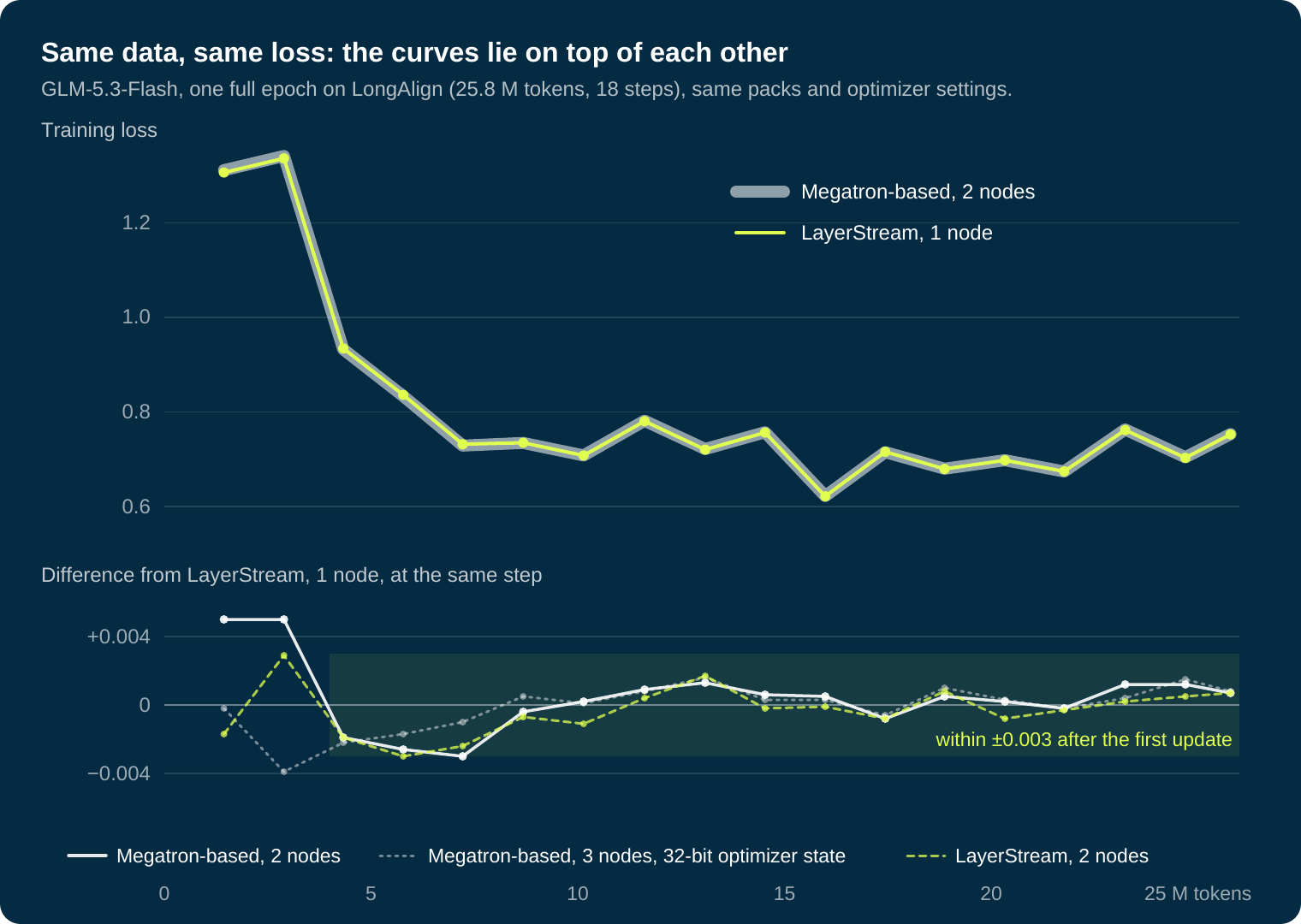
We also checked whether the changes alter the training trajectory: GLM-5.3-Flash trained for one full epoch (25.8 million tokens, 18 steps) with LayerStream and with our Megatron-based trainer, on the same data, the same packs at every step, and matching optimizer hyperparameters. Optimizer-state precision differs as described below.
- Closely matching loss curves. From the first update on, the Megatron-based run stays within 0.003 of LayerStream at every step, as close as two LayerStream runs are to each other. Before the first update the two differ by at most 0.005, from their forward kernels alone.
- Small loss differences with 16-bit optimizer state. Against the Megatron-based trainer with full 32-bit optimizer state, LayerStream with 16-bit state stays within 0.0022 from the first update on.
- AdamW update checks. With 32-bit optimizer state, LayerStream’s update performs the same operations in the same order as PyTorch’s reference AdamW, so every updated weight is bit-identical. Each run checks this by replaying sampled updates on the CPU and comparing the bits.
A separate timing comparison, distinct from the runs plotted in Figure 4, uses the same 16 B300 GPUs for each trainer: LayerStream takes 32 seconds per step, the Megatron-based trainer 126 seconds, about 3.9× longer. The Megatron-based CPU optimizer was given 12 threads per rank for this comparison.
All reported runs train without gradient clipping. LayerStream updates layers before the full-model gradient norm is available, so exact global gradient clipping is not supported by this update scheme.
These checks cover one epoch and the reported optimizer configurations. They do not establish equivalent downstream task quality or convergence over longer training runs.
What to compare for your own workload
Long-horizon agentic tasks produce long trajectories, and training on them, whether by fine-tuning or reinforcement learning, consumes tokens at a scale where cost per token decides what is practical.
Extrapolating the GLM throughput rates gives about USD 500 in GPU time per billion training tokens on 32 H100 with LayerStream, versus about USD 2,460 on 24 B300 with our Megatron-based trainer. These are GPU-only estimates at the stated prices, not measured billion-token runs or total service bills. They inherit the different-data baseline limitation.
For your own workload, compare three things together: whether the model fits, how quickly the complete job processes tokens, and the GPU cost of processing them. Use matched data and training settings, then evaluate the resulting model on your tasks. A lower hourly GPU price is useful only if the full configuration delivers the throughput and quality you need.
Discuss your training workload with Nebius
We are extending LayerStream to more and larger models and continuing to improve throughput. LayerStream is integrated into the Nebius managed training API.
If GPU memory is setting the size of your fine-tuning cluster, talk to the Nebius Token Factory team about your model, context length, and training workload, and ask about LayerStream access.
Measurement notes. Throughput counts training tokens for the whole job, excluding padding and startup. GPU-only costs use Nebius on-demand prices dated November 16, 2026: H100 USD 4.50, H200 USD 5.40, and B300 USD 9.50 per GPU-hour. The main GLM throughput baseline uses other data and an RL loss; the separate matched-data loss and step-time comparisons are described above.
Acknowledgment. LayerStream’s core idea, keeping training state in host memory and streaming it through the GPU one layer at a time, was inspired by NexTron from Physion Labs. LayerStream is our own implementation of that idea for large mixture-of-experts models.
Explore Nebius Token Factory


Contents
See also

Choose a post-training method by the feedback your team can produce. Compare SFT, preference tuning, RL, and distillation, then evaluate the adapted model against your quality, latency, and cost targets.

Our internal RL auto-tuner profiles each training step, forecasts which configuration changes will help, and tests them in real runs. On NVIDIA B300 GPUs across four models and two workloads, it made steps 1.42–4.93× faster on the same GPU budgets, with a 3.5× median. Five lessons from 210 runs, including why a faster inference engine did not speed up training.

Faster model inference does not necessarily mean faster agentic RL training. In this article, we show how improvements to routing, sandbox execution and batch assembly reduced fixed-weight batch collection time by 66.9%, from 591.8 to 196.1 seconds for 256 trajectories.