
Inside the Nebius + PyTorch DeepSeek V3 recipe: NVSHMEM and DeepEP for wide expert parallelism
Inside the Nebius + PyTorch DeepSeek V3 recipe: NVSHMEM and DeepEP for wide expert parallelism
In 2026, nearly all frontier models are mixture-of-experts (MoE). Expert parallel (EP) is the most natural and efficient scheme to split the model up during training. However, enabling EP in training quickly reveals a key bottleneck: all-to-all communication that shuffles tokens between experts on every layer quickly dominates runtime. The irregular traffic pattern proves to be poorly suited to standard NCCL collectives, and most of the efficiency that makes MoE attractive disappears into communication overhead.
The alternative is GPU-initiated RDMA. NVSHMEM and DeepEP let GPUs read and write each other’s memory directly: across nodes, from inside CUDA kernels, with minimal CPU involvement.
On Nebius, adding DeepEP to a DeepSeek V3 training run on 256 B200 GPUs lifted model FLOPs utilization (MFU) by up to ~65% with no meaningful memory cost. This guide covers why MoE breaks collectives, the libraries that fix it, what we measured, and how to set it up on Nebius.
Why ML labs are switching to RDMA
Collective communication, where multiple GPUs participate in a single coordinated data exchange, is the default for distributed ML. NCCL operations like all-reduce and all-gather deliver high throughput for predictable workloads, which makes them a natural fit for dense LLMs using data, tensor, and pipeline parallelism.
MoE breaks that assumption: the router decides at each step how much data goes where, so transfer sizes and destinations change from step to step. Forcing that into strict collectives is inefficient, and ML labs are increasingly turning to RDMA point-to-point instead.
Mixture-of-experts and wide expert parallelism
In an MoE model, the dense feed-forward network (FFN) at the end of each Transformer block is replaced with a sparse block split into experts. On each token, only a small subset of experts (top-K) activates, which keeps compute cost low while preserving quality.
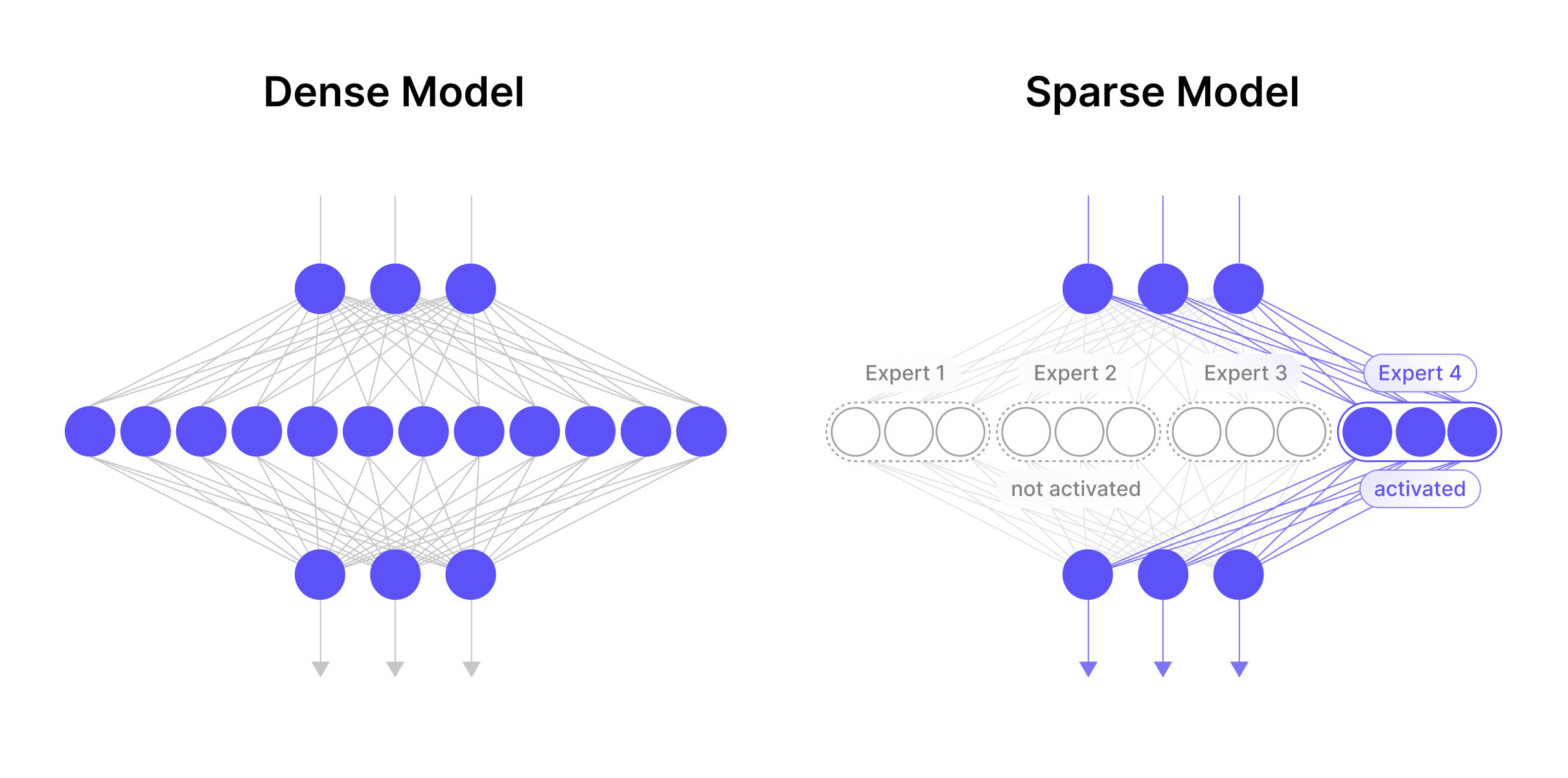 Left: dense LLM. Right: MoE, where the FFN becomes a set of routed experts
That sparsity makes MoEs cheap to serve but heavy on parameters, and it maps naturally onto expert parallelism (EP): partition the experts across GPUs so each holds only a subset. Modern MoEs are sparse enough that it’s often most efficient to scale EP across many nodes at a high EP degree — a technique known as Wide-EP.
DeepSeek V3 is a good example: 671B total parameters, but only 37B activate per token across 256 experts. With EP32 and DP32:
- Each GPU holds just 8 of the 256 experts, using far less HBM.
- With a high DP value, more ranks send tokens to fewer experts per GPU, so each expert processes more tokens per step, raising arithmetic intensity.
- Each GPU loads weights simultaneously, increasing aggregate HBM bandwidth 4x versus a single-node deployment and easing the memory bottleneck proportionally.
The catch: the higher the EP degree, the more cross-node communication dominates runtime. Every MoE layer needs two all-to-all exchanges: a dispatch phase that sends tokens to their assigned experts, and a combine phase that returns expert outputs to their original positions.
Because each rank must talk to every other rank, message count grows quadratically with the number of workers. At a high EP degree, all-to-all becomes the bottleneck and the gains above go to waste, which is exactly why any communication improvement pays off end to end. NVSHMEM and DeepEP are how we capture it.
The building blocks: NVSHMEM, RDMA, GPUDirect, IBGDA, GDRCopy
RDMA-based point-to-point lets GPUs read from and write to remote GPU memory directly, with minimal CPU involvement. Because it skips collective setup and synchronization, it can deliver much lower latency for the small, dynamic GPU-to-GPU transfers MoE generates.
NVSHMEM is NVIDIA’s library for GPU-initiated RDMA. It exposes a Partitioned Global Address Space (PGAS): each GPU maps a symmetric memory region that every other GPU can address directly, reading or writing any peer’s memory — within or across nodes — from inside CUDA kernels, without CPU involvement.
It builds on two primitives. RDMA lets a NIC access DRAM directly without CPU orchestration; GPUDirect RDMA extends that to read and write GPU HBM directly. NVSHMEM picks the fastest available fabric automatically: NVLink within a node, InfiniBand between nodes.
For MoE, where many small messages cross InfiniBand, latency is far higher than for the same operations over NVLink. NVSHMEM narrows the gap with InfiniBand GPUDirect Async (IBGDA). Standard GPUDirect RDMA still leaves the CPU in the loop to tell the NIC what to do; IBGDA removes that dependency and lets the GPU drive the NIC directly.
Both NVSHMEM and DeepEP also use GDRCopy, which gives the CPU RDMA access to GPU memory to speed up small CPU↔GPU transfers.
DeepEP
DeepEP attacks the communication bottleneck directly, with purpose-built GPU-initiated kernels for dispatch and combine, built on NVSHMEM’s symmetric memory and RDMA. It ships two kernel families for different regimes: high-throughput kernels for training and prefill, and low-latency pure-RDMA kernels for decode. That low-latency path is especially useful for inference that combines Wide-EP with prefill/decode disaggregation. DeepEP also supports low-precision operations, including FP8. It was the first library of its kind, and it’s still the one others are measured against.
Benchmarking DeepEP on Nebius
We worked with PyTorch to build a high-performance DeepSeek V3 training recipe on TorchTitan, running on 256 B200 GPUs managed by Soperator.
The early numbers, for DeepSeek-16B (64 experts) and DeepSeek V3-671B (256 experts):
| Model | MFU without DeepEP | MFU with DeepEP | Throughput gain |
|---|---|---|---|
| DeepSeek-16B (64 experts) | 8.29% | 13.64% | ~65% |
| DeepSeek V3-671B (256 experts) | 11.22% | 13.99% | ~25% |
That’s roughly 65% and 25% throughput gains, with no meaningful increase in memory. For frontier-scale MoE training, gains that size change what a run costs. Read the full recipe to reproduce these results.
We’ve also built a high-throughput DeepSeek inference solution with vLLM, using llm-d, Wide-EP, and prefill/decode disaggregation, all enabled by DeepEP.
How to set it up on Nebius
The steps below assume Soperator or Managed Kubernetes nodes; VM users follow the same flow. Full instructions are available on GitHub.
1. Set up the Python environment
python3 -m venv ~/venvs/deepep && source ~/venvs/deepep/bin/activate
pip install "torch==2.13.*" --index-url https://download.pytorch.org/whl/cu130
pip install numpy ninja
pip install --force-reinstall --no-deps "nvidia-nccl-cu13>=2.30.4"   # torch pins 2.29.x; DeepEP needs >=2.30.4 to build
sudo apt update && sudo apt install -y python3-dev libibverbs-dev
2. Identify the GPU fabric NICs
for d in /sys/class/infiniband/*; do
echo "d) d/ports/1/rate) d/ports/1/link_layer) pkey0=d/ports/1/pkeys/0)"
done
Use the following NIC ranges for each GPU type:
- H100/H200:
mlx5_0..7 - B200/B300:
mlx5_4..11 (exclude mlx5_0..3) - GB200/GB300:
mlx5_0..3
3. Configure the environment
export HCA='mlx5_0:1,mlx5_1:1,mlx5_2:1,mlx5_3:1,mlx5_4:1,mlx5_5:1,mlx5_6:1,mlx5_7:1'    # H100/H200
# export HCA='mlx5_4:1,mlx5_5:1,mlx5_6:1,mlx5_7:1,mlx5_8:1,mlx5_9:1,mlx5_10:1,mlx5_11:1' # B200/B300
# export HCA='mlx5_0:1,mlx5_1:1,mlx5_2:1,mlx5_3:1'                                        # GB200/GB300
ulimit -l unlimited   # RDMA needs pinned memory
4. Install DeepEP v2
export TORCH_CUDA_ARCH_LIST="9.0"  # 9.0 H100/H200 · 10.0 B200 · "10.3" B300
git clone https://github.com/deepseek-ai/DeepEP.git
cd DeepEP && git checkout dd758ca   # v2.1.0
sed -i 's/"r"(kNumBytes)/"n"(kNumBytes)/' deep_ep/include/deep_ep/common/ptx.cuh   # CUDA 13 only
5. Test the v2 engine
After installation, run the tests to verify everything is working. One process per node (it forks 8 local ranks); RANK is the node index:
MASTER_ADDR=localhost MASTER_PORT=29500 WORLD_SIZE=1 RANK=0 python tests/elastic/test_barrier.py --num-allocated-qps 8
MASTER_ADDR=localhost MASTER_PORT=29500 WORLD_SIZE=1 RANK=0 python tests/elastic/test_ep.py --num-allocated-qps 65   # ~8 min (includes first-use JIT compile)
# 2 nodes: same commands on both nodes, MASTER_ADDR=<node0-ip> WORLD_SIZE=2 RANK=0|1
Recommended settings
Restrict NCCL to the GPU fabric NICs selected above:
export NCCL_IB_HCA="=$HCA"                       # '=' = exact match (NCCL-only syntax)
export EP_NIC_NAME=mlx5_0                        # any fabric NIC
export EP_JIT_CACHE_DIR=/tmp/deep_ep_jit-$USER   # node-local
# In code: ElasticBuffer(..., num_allocated_qps=65)   # VF QP budget; 33 at 4+ nodes
Note
The benchmark results reported earlier in this post were produced with DeepEP v1 at commit 29d31c0. The instructions above describe the current DeepEP v2 setup. If you need to reproduce the original benchmark environment exactly, see the legacy v1 installation instructions in the Nebius ML Cookbook.
Run it on your own MoE workload
MoE moved the bottleneck in distributed training from compute to communication, and the all-to-all between experts is where a wide expert-parallel run either pays off or stalls. GPU-initiated RDMA through NVSHMEM and DeepEP turns that bottleneck back into headroom: on a DeepSeek V3 run on 256 B200 GPUs, it bought up to ~65% more throughput at no real memory cost. On Nebius, capturing that comes down to installing the right kernels and pointing NVSHMEM at the correct InfiniBand ports.
Spin up a Soperator cluster, enable IBGDA, and run DeepEP against your own MoE workload. Run it from this GitHub cookbook, or try it on Nebius AI Cloud.
Explore Nebius Token Factory
See also
In collaboration with PyTorch, Nebius helped demonstrate up to 41% faster pre-training of DeepSeek-V3 models on NVIDIA Blackwell GPUs.

MLPerf® Training 6.0 results are in. Across six configurations on NVIDIA Blackwell Ultra systems, Nebius posted the #1 single-node HGX B300 times for Llama-3.1-8B and GPT-OSS 20B pre-training and came within 3.1% of the fastest GB300 NVL72 result on all three benchmarks at 72 GPUs. This post covers the full results and methodology.
Introducing Aether 3.6. Our latest quarterly platform release responds to how AI teams now operate at scale and with maturity, delivering a smoother developer experience, a stronger security and compliance foundation, advances across our in-house storage portfolio, and natural-language control over your AI cloud.