
OpenClaw security: architecture and hardening guide
OpenClaw security: architecture and hardening guide
Self-hosted AI agents offer control and flexibility, but they also introduce real security risks. Incidents involving malicious ClawHub skills, exposed default ports and prompt-injection attacks show that running OpenClaw is not just an installation task, but an infrastructure decision. This guide explains OpenClaw’s architecture and maps real threats to concrete-hardening controls, so teams can deploy it safely in production.
OpenClaw has quickly evolved from a developer-focused install guide to a serious infrastructure component that teams are evaluating for production use. As a self-hosted AI agent gateway, OpenClaw acts as a core security boundary across messaging channels, sandboxed tool execution, ClawHub skills, memory and model inference.
This also means it is a critical security boundary. Recent incidents involving malicious skills, exposed default ports and prompt-injection attacks have shifted the question from “How do I run OpenClaw?” to “Is it safe to run?”.
This article answers that question in depth. We’ll break down OpenClaw’s security architecture, from the Gateway and WebSocket protocol to sandboxing controls, ClawHub skills, tools and memory, through the lens of OpenClaw security.
We’ll map real-world threats to concrete configuration controls. You’ll get a practical hardening checklist, deployment patterns and security testing strategies to run OpenClaw in production confidently.
What is OpenClaw
OpenClaw is an open-source, self-hosted agent gateway for running AI agents across messaging apps and tools.
Its core components include:
- Gateway: Routes requests and manages orchestration;
- Clients: User-facing interfaces (e.g., chat apps);
- Nodes: Execute agent workloads;
- Sessions: Maintain conversational state;
- Tools and skills: Extend agent capabilities;
- Memory: Stores context across interactions.
OpenClaw overview and roles
OpenClaw’s core Gateway process plugs into platforms like WhatsApp, Telegram, Slack and Discord, then waits for clients to connect. CLI tools, web interfaces and scripts connect to the Gateway as clients, while mobile or background agents connect as nodes. Each one declares what it is when it first establishes a connection, allowing the system to route requests appropriately.
All traffic flows through a single port (by default, 127.0.0.1:18789). This includes the control UI and the routing logic that routes messages to the appropriate AI agent.
Each conversation runs in its own session, complete with a dedicated AI agent and memory. The Gateway persists all session history to disk, ensuring conversations survive restarts and system interruptions.
Channels and integrations
OpenClaw connects to messaging platforms including WhatsApp, Telegram, Slack, Discord, Signal and iMessage via built-in connectors. It supports external LLM endpoints and embedding providers and extends agent capabilities through a configurable skill system covering custom scripts, APIs and third-party services.
What OpenClaw is not
By design, OpenClaw is not a managed cloud agent service or a simple chatbot library. It runs entirely on your infrastructure, so you own the deployment, updates and security. Unlike a SaaS agent (which scopes identity and sandboxing in the cloud), OpenClaw inherits all the trust of its host machine and credentials.
Installing a ClawHub skill is effectively running third-party code on your host, so OpenClaw “should be treated as untrusted code execution with persistent credentials”. Here’s a quick comparison with managed agent platforms and developer frameworks.
| Aspect | OpenClaw (Self-hosted) | Managed Platforms | Agent Frameworks |
|---|---|---|---|
| Deployment | You run the Gateway on your own host | The vendor runs everything | You embed a library in your app |
| Updates | You handle upgrades | Vendor handles updates | You manage dependencies |
| Tool control | Tool policy + Sandbox + optional Elevated mode | Vendor-defined controls | Depends on your runtime |
| Ecosystem | ClawHub skills | Built-in cloud connectors | NPM / PyPI packages |
| Security responsibility | Fully yours | Shared with vendor | Fully yours |
In other words, it’s a full application you run and secure, not a hosted chatbot, with the benefit that you control data, models and scale.
Architecture / Core mechanism: Gateway & runtime internals
OpenClaw runs as a single Gateway process on your host. Clients, agent nodes, messaging channels and tools all connect through it. The sections below walk through how each layer is wired together.
Gateway WebSocket API and state management
Running AI agents across multiple channels creates a coordination problem. Every message, session and tool call needs a single place to land. In OpenClaw, that place is the Gateway, a single background process that runs continuously on your host and owns every channel integration.
Clients connect to it over WebSocket on port 18789 by default. As soon as a connection is established, it identifies itself by sending its role, device identity and, if required, an authentication token. Nodes (mobile or desktop agents) declare their capabilities upfront. Control clients like the CLI or web UI identify as operators. From there, the Gateway queues incoming messages, dispatches them to the agent runtime and routes responses back to the right chat source.
Nothing is lost between restarts. The Gateway writes everything to a local state directory (~/.openclaw by default), including config, credentials, session histories, agent workspaces, tool caches and memory snapshots. Each agent’s conversation history lives under agents/<agentId>/sessions/, so context survives across runs.
The Gateway continuously watches the config file and applies valid changes immediately without requiring a restart. If a change is invalid, it rejects it before it can cause damage.
Run the following command to catch and fix any errors.
openclaw doctor
Despite owning all of this, the Gateway stays lightweight. A Raspberry Pi can comfortably run it. The heavy work, including model inference and embeddings, is offloaded to external services.
Tool policies, sandbox and elevated modes
Not every tool an agent runs should have access to your filesystem. OpenClaw handles this by letting you control exactly where and how tools execute, whether on the host, inside a Docker container or not at all.
Sandboxing is configured at three levels:
- Off;
- Non-main;
- All.
The default is non-main, meaning group chats and secondary threads run in isolated containers while your primary session stays on the host. If you switch to all, every tool call runs in a container. You can scope containers per session or per agent and control whether the workspace is mounted as read-only or not mounted at all.
There’s one deliberate escape hatch. Tools flagged as elevated always run on the host, even when the agent is sandboxed. This is intentional. Some shell commands need direct host access. Elevated mode doesn’t bypass your tool policy, though. It only lets those specific commands escape the container.
Tool availability itself is governed by an allowlist. Only tools you explicitly permit can run. If a tool matches both an allow rule and a deny rule, the deny rule takes precedence and the tool will be blocked. In multi-agent setups, each agent carries its own policy. One agent can be locked to read and web_search while another gets full exec access. Typing /exec in a chat adjusts per-session permissions for that user, but it can’t grant tools beyond what the allowlist already permits.
Skills and ClawHub registry
Skills are versioned bundles containing a SKILL.md and any supporting scripts or data, used to extend agent capabilities with new APIs, commands or custom code. Install one with clawhub install <skill-name> and it lands in your agent workspace under ./skills. Every new session automatically loads all installed skills.
The public ClawHub registry is where skills are published and discovered. Each release gets a semantic version number, a changelog and tags. ClawHub also indexes skill content with vector embeddings, so search surfaces relevant skills rather than just keyword matches.
One thing worth knowing is that skills can execute arbitrary code, including shell commands. A malicious or poorly written skill can meaningfully compromise agent behavior. Treat skill installs the same way you’d treat installing a package from a public registry.
Memory subsystem and RAG
Most agent frameworks hide memory behind opaque internals. OpenClaw takes the opposite approach. Everything the agent knows is plain Markdown on disk. If it hasn’t been written down, the agent doesn’t remember it.
Each agent keeps two files, which include a daily log (memory/YYYY-MM-DD.md) for recent context and MEMORY.md for long-term facts. A background indexer chunks both into a local retrieval index, combining full-text and vector search.
When the agent queries its memory, it runs a semantic search over this hybrid index. The diagram below illustrates this flow:
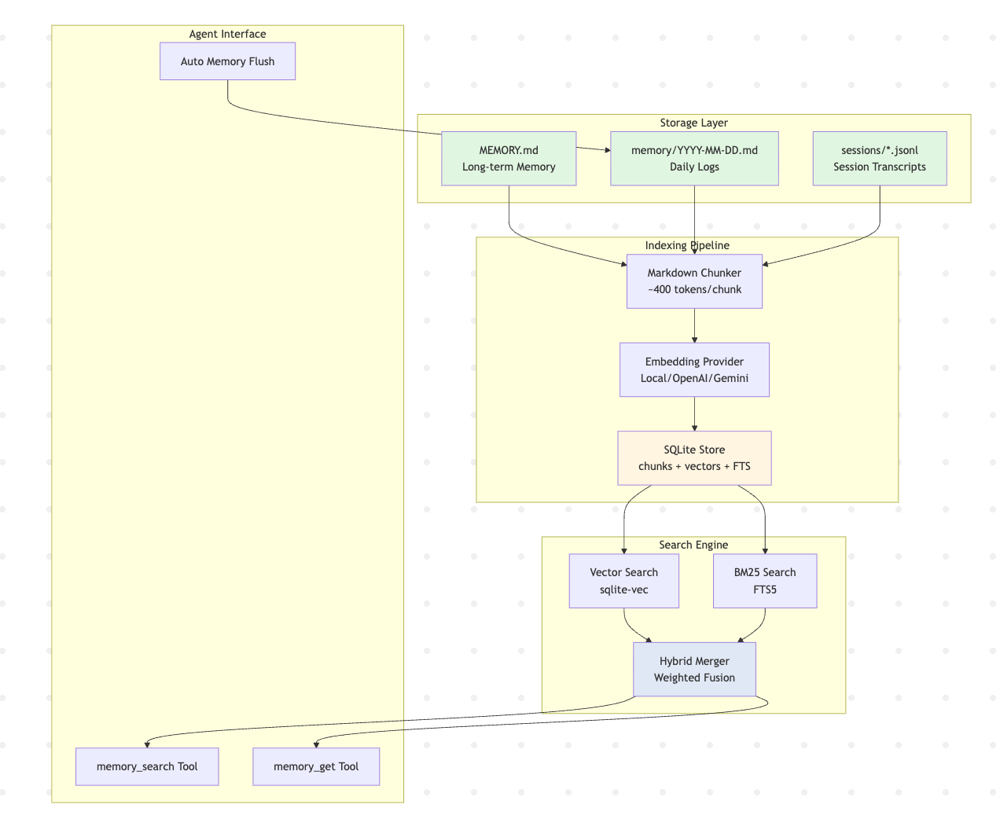 Figure 1. OpenClaw’s Workspace Memory System. Agent writes structured notes, which are indexed into a local SQLite FTS+vector store. Memory-search tools query this index to retrieve relevant context for the agent.
You can also open, read and edit the files. No hidden states to debug. When you outgrow local storage, point OpenClaw to an external vector database (Pinecone or Milvus) and the same Markdown files power a full RAG pipeline at scale. Nothing needs to be restructured.
Implementation / Setup: Installation and secure defaults
OpenClaw is designed to be self-hosted, which means setup and security are in your hands from the start. The onboarding wizard handles the essentials, but understanding how the config file, port binding and auth tokens work together keeps your Gateway locked down.
Install and onboarding
The recommended installation is via the official script and onboarding wizard. For example:
curl -fsSL https://openclaw.ai/install.sh | bash
openclaw onboard --install-daemon
This process downloads and bootstraps OpenClaw, then launches an interactive configuration wizard that installs and runs the Gateway as a system daemon. The wizard walks you through creating your first agent, including its ID and name, selecting models and configuring essential channels. It also generates a gateway token by default to secure the WebSocket API.
During onboarding, OpenClaw builds the web UI assets and opens the dashboard on localhost. Once setup completes, the Gateway typically runs in the background on port 18789. The CLI tool:
openclaw
becomes your main interface for managing the gateway and agents.
Configuration file basics
OpenClaw’s configuration lives in ~/.openclaw/openclaw.json. If this file is absent, OpenClaw uses safe defaults. The config follows a strict JSON Schema: any unknown or invalid key will prevent the Gateway from starting. Keys cover channels (e.g., WhatsApp with auth tokens and DM policies), agents, tools, models, sandboxing, networking and more.
For example, the default config includes something like:
{
  agents: { defaults: { workspace: "~/.openclaw/workspace" } },
  channels: {
    telegram: { enabled: true, botToken: "TOKEN", dmPolicy: "pairing", allowFrom: ["tg:123"] }
  },
  gateway: { bind: "loopback", port: 18789 }
}
Config edits can be made in three ways:
- Interactively via
openclaw configure; - Via the Control UI form;
- By editing the file directly.
The Gateway watches the config file and applies changes automatically on the fly. There are also CLI getters/setters (openclaw config get/set) for scripting.
Access control
Secure defaults are critical. By default, OpenClaw binds only to localhost (gateway.bind: "loopback") and uses a randomly generated token/password for auth. We strongly recommend keeping the Gateway bound to loopback or a private network.
If you need remote control, use SSH tunneling or an identity-aware VPN like Tailscale. (OpenClaw supports a Tailscale “serve” mode to expose the UI securely.) If you ever configure gateway.bind as “lan” or similar, be sure to set a strong gateway.auth.token; non-loopback binds require token auth. Never run the Gateway on a public interface without a token and firewall.
On the host, use something like:
gateway: {
  bind: "loopback",  // or "tailnet"
  port: 18789,
  auth: { token: "YOUR_SECRET_TOKEN" }
}
This ensures the WebSocket control plane is locked down. In each channel config, also set dmPolicy and group policies for inbound messages.
For example, the default dmPolicy: "pairing" means unknown contacts get a one-time code to confirm before chatting. Avoid dmPolicy: "open" unless you really want anyone to message the bot. As a best practice, “keep inbound DMs locked down” (pairing or allowlist) and require explicit mention in group chats.
Operational commands and security tools
The openclaw CLI provides diagnostics and security audits. After deployment, run openclaw doctor to check system health and apply fixes. Use openclaw doctor -- repair (or --deep) to auto-heal known issues.
For security-specific checks, use openclaw security audit. This command inspects your configuration and environment for common pitfalls.
For example, it will warn if the gateway is bound to 0.0.0.0 without a token or if dangerous debug flags are enabled. You can run openclaw security audit --fix to auto-correct some issues. These tools should be part of your routine: run the audit after any config change or new skill install.
Also, use openclaw sandbox explain (or --session) to verify the effective sandbox and policy for any agent session. Together, these commands help ensure your setup matches your intended security posture.
Use cases: Practical deployments and anti-patterns
How you deploy OpenClaw depends entirely on what you’re building. A personal assistant on a local machine looks very different from a multi-agent system running across a team. This section covers the common setups, useful patterns and the misconfigurations that tend to cause the most damage.
Single-user productivity setup
For personal use, OpenClaw runs comfortably on a lightweight machine, even on a Raspberry Pi with 512MB-1GB of RAM. The Gateway binds to localhost, your own accounts are paired via dmPolicy: "pairing" and the agent gets broad access because you’re the only one sending it commands.
Sandboxing can be mostly off (sandbox.mode: off) since you implicitly trust yourself. You might only sandbox specific risky tools like browsers or web search. The benefit is low friction. The agent can read email, execute code and manage files, all while staying isolated on your own device.
Team / Multi-user deployment
In larger setups, OpenClaw supports multiple agents defined under agents.list, each with its own workspace, tool policy and model. A sales assistant agent might have CRM tools enabled. A DevOps bot might have server scripts allowed. Permissions stay separate by design.
The Gateway typically runs on a private-cloud VM in this scenario, binding to a private interface or a loopback address behind a VPN. Each user’s CLI or mobile client connects in as an operator. Skills can be centrally managed. The team curates approved ones via the clawhub CLI and agents auto-load them from a shared workspace directory.
With multiple agents comes more surface area for mistakes. Sandboxing should be on (sandbox.mode: "non-main" or "all") for any public-facing agent and tool allowlists (tools.allow) should be explicit. If an agent doesn’t need exec, it shouldn’t have it.
Common patterns: RAG and chatbot backends
OpenClaw is commonly used as a backend for multi-turn chatbots, particularly ones that need to retrieve knowledge before answering. A typical pattern starts when a user sends a query through a messaging channel. The agent either runs memory_search or queries a vector database and the LLM returns the retrieved context.
Some teams go further and use OpenClaw as a message bus. An agent watches a Slack or Discord channel, detects a trigger and kicks off a workflow via exec or a custom plugin. In these setups, partitioning privileges matters. A RAG agent should have only search and read permissions, while a messaging agent with broader permissions should run within a tighter Docker scope.
Anti-patterns to avoid
A few misconfigurations recur and they’re worth naming directly. Binding the Gateway to 0.0.0.0 on an untrusted network is the most dangerous one. Port 18789 should be firewalled or access-limited. Leaving it open gives attackers a direct line to your agents. Leaving dmPolicy: "open" is similarly risky. Anyone who can reach the bot can message it. Use "pairing" or an explicit allowlist.
Giving every agent full tool access, especially exec and apply_patch, breaks the least-privilege model entirely. This matters more than it might seem since the threat doesn’t only come from outside.
The ClawHavoc campaign made this concrete in January 2026. Hundreds of skills in the ClawHub registry were found to contain malware, including an Atomic Stealer payload that harvested API keys, injected keyloggers and wrote malicious content directly into MEMORY.md and SOUL.md for persistent effect across sessions. One skill posed as a cryptocurrency trading tool and silently stole wallet credentials from the agent’s environment.
The lesson is clear. Treat unverified ClawHub skills like untrusted code from an unknown source, audit every skill before installing it and run new skills in a sandbox with minimal permissions until you confirm they are safe.
Evaluation & benchmarking: Performance and safety checks
Measuring an AI agent’s performance is only half the picture. The other half is knowing whether it can be compromised and having the controls in place to prevent it.
Capability metrics
When evaluating OpenClaw for production, measure standard AI agent metrics. Track latency (round-trip time for agent response), throughput (how many messages per second per agent under load) and LLM token usage (for cost monitoring) across your typical workflows.
Also assess task accuracy or success rates in your use cases. Benchmarking should consider multi-agent concurrency. By default, OpenClaw serializes messages per session, but agents run in parallel across sessions.
Test scenarios like 10 concurrent agents posting queries. Since the Gateway itself is light, focus on the downstream model service (CPU/GPU) performance. In lab tests, the Gateway can handle dozens of short chats per second, but heavy LLM calls will be the limiter.
Security metrics: Attack simulations
Security evaluation should include adversarial tests. Simulate direct prompt injection by sending messages containing hidden instructions or system-prompt equivalents. Also test indirect injections by feeding malicious content from tools like web search or file read. Monitor whether such prompts can trigger unauthorized actions or memory changes.
You can use known threat patterns. For example, OWASP’s GenAI Top 10 describes prompt injection as a key risk. Measure the “infection rate” in these tests to see what percentage of malicious inputs bypass your filters or policies. Verify that sensitive tools (exec, browser) are unreachable to an attacker-controlled agent. If not, the sandbox or policy needs tightening.
Finally, confirm that audit logs capture critical events (failed auth, pairing requests, permission denials) so you can trace incidents.
Security checklist and compliance
Create a deployment checklist from both OpenClaw’s docs and general AI-security best practices. Items include a locked-down OS user for the Gateway, a firewall rule for port 18789, rotating the gateway token periodically and isolating the state directory (file permissions 700). Ensure audit logs are centralized and monitored. For each new skill or tool, document a threat analysis.
Align controls with frameworks like OWASP GenAI. For example, validate output formats and enforce least-privilege access to tools. Also, have a recovery plan including nightly backups of ~/.openclaw (state + workspace) and scripts to rebuild the Gateway VM/container from a fresh OS. With these metrics and checks in place, decision-makers can feel confident in OpenClaw’s safety profile.
Trends / Future: Agent ecosystem & OpenClaw’s path
Agent platforms are rapidly evolving. Public skill registries (like ClawHub) are growing and many organizations want on-device agents rather than cloud-hosted chatbots. This fuels demand for self-hosted gateways like OpenClaw.
At the same time, research in prompt engineering and adversarial inputs (e.g., OWASP GenAI) emphasizes that AI systems need hardened input-handling. The ClawHavoc incidents highlight the supply-chain risk in agent ecosystems, pushing the trend toward stronger vetting and sandboxing tools.
In model development, the rise of RAG and fine-tuning means agents will link into data stores and custom LLMs. OpenClaw’s file-based memory and optional vector search fit into this. Teams often couple OpenClaw with fine-tuning workflows, e.g., sending user feedback back to a retraining pipeline.
In short, as agents become the UI for AI, on-prem gateways like OpenClaw bridge between flexible research models and enterprise controls.
Infrastructure requirements: Production deployment patterns
OpenClaw’s architecture separates the control plane from model inference, keeping the Gateway lightweight while offloading heavy computation to external services. The sections below cover how to split compute responsibilities, lock down networking, isolate agent workloads and protect sensitive data on disk.
Split compute
OpenClaw’s architecture cleanly separates the control plane from the inference plane. The Gateway itself is light on resources (1 CPU, <1GB RAM suffices). It can run on a small VM or Kubernetes node. However, the agents it orchestrates often call large LLMs or embedding models, which need GPUs or scalable inference services.
In a secure setup, you would run the Gateway on a minimal host (perhaps in a Kubernetes cluster with a CPU node) and route actual model workloads to dedicated GPU nodes or external APIs.
For example, you might deploy a Kubernetes cluster for OpenClaw with a CPU-only control-plane pod (the Gateway) and use a Nebius GPU compute cluster for TensorFlow or PyTorch inference. These pods communicate over internal networking and the Gateway never sees raw model weights.
Network and access
Bind the Gateway to a private interface or localhost. If using K8s, deploy it as an internal service or integrate it with TLS. Externally, proxy or VPN through port 18789. Rotate the gateway.auth.token regularly and never hard-code tokens in containers (use Kubernetes Secrets or a vault).
Disable any unauthenticated endpoints (gateway.http.endpoints are off by default). Use Nebius’s distributed training infrastructure if you need high-bandwidth connections between GPU nodes (e.g., for large-model inference and fine-tuning).
Isolation
Run the Gateway and agents as non-root users in containers or VMs. Use Docker or Podman to enforce sandbox mode (agents.defaults.sandbox) on risky agents. Define strict tools.allow lists. For instance, give most agents only “safe” tools like memory_get, browser.search and withhold exec, apply_patch, read unless absolutely needed. Avoid giving tools.elevated permissions except for highly trusted agents.
If multiple agents share the host, consider giving each agent its own OS user or container, so a compromise of one agent cannot directly read another’s memory. In essence, treat the Gateway host as an untrusted environment and isolate as much as possible.
Data and secrets
Agent workspaces can accumulate credentials (via OAuth or API keys). Ensure these are treated carefully. Use OpenClaw’s built-in secret store or mount external vault tokens. Do not store secrets in plaintext AGENTS.md or SOUL.md.
Mount the state directory with 700 permissions so that only the OpenClaw user can access secrets and sessions. Regularly scan the ~/.openclaw directory for sensitive files (credentials, auth profiles). The openclaw doctor command can even warn if it detects overly permissive file modes.
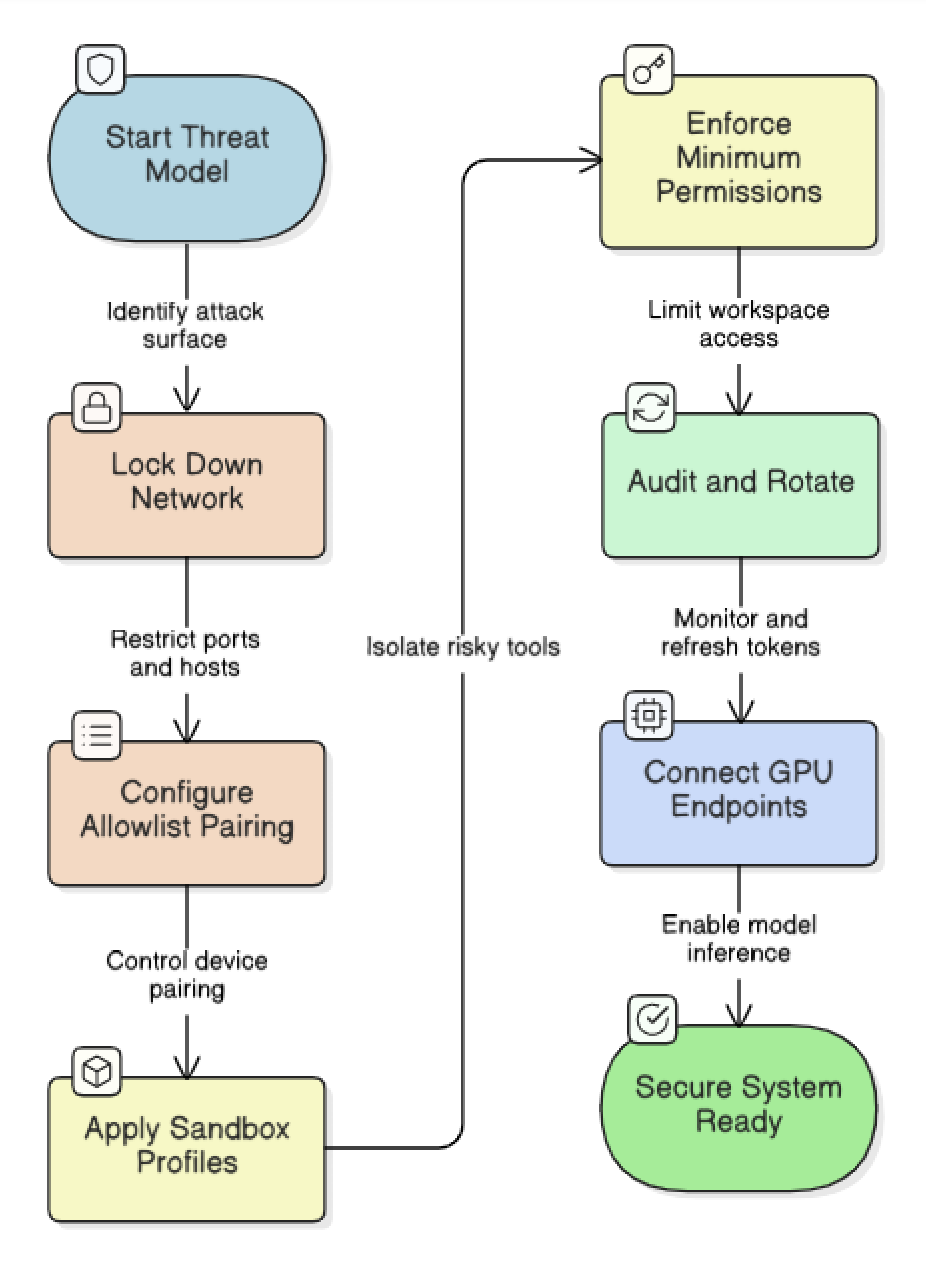 Figure 2. Threat Modelling for OpenClaw
A secure on-prem setup might look like a private Kubernetes namespace running an OpenClaw gateway pod (CPU-only), with persistent volumes for ~/.openclaw. Agent nodes could be sidecar containers on user machines or further pods that connect back.
Conclusion
OpenClaw gives teams full control over their AI agent architecture and security boundaries. That control requires responsibility for security, isolation and operational discipline. Understanding Gateway trust boundaries, enforcing strict tool policies, sandboxing untrusted skills and hardening network exposure enable organizations to run self-hosted agents safely in production.
In a Nebius AI-cloud environment, OpenClaw fits into the managed AI stack. Configure OpenClaw’s provider plugins to use Nebius’s Token Factory to route LLM calls and embeddings to Nebius-hosted models. Use a Nebius-managed vector database for memory retrieval. Handle multi-modal knowledge pipelines, including documents and images, through Nebius’s multimodal RAG infrastructure.
OpenClaw handles the on-prem gateway and session management, while Nebius provides the scalable inference and storage backends. Together, they form an OpenClaw security–aligned AI infrastructure stack with enterprise-grade isolation and controlled upgradability.
Explore Nebius AI for AI workloads to get started with GPU-backed inference for your OpenClaw agents.

Contents
See also

To go from prototype to production, AI agents need more than just a good model. In this guide, we break down the four components that matter most: reliable LLMs, orchestration frameworks, evaluation tools, and memory systems. We cover how teams are using Nebius AI Studio with CrewAI, ADK, LangChain, and more to ship scalable, observability-friendly agent workflows, all powered by fast, cost-efficient inference.

In this short research blog post, we discuss how reinforcement learning-finetuned reasoning language models can be used as a better alternative to regression-based critics when performing parallel trajectory search in test time, and how to train such models to prioritize precision over recall.

When starting a job, you expect it to run without interruptions. This expectation holds true across many domains, but it resonates especially deeply with machine learning engineers who launch large-scale pre-training jobs. Maintaining a stable training environment is crucial for delivering AI results on schedule and within budget constraints.